It’s very simple. In your user account, under the “Family” section, add either the SkiResort Card number or the SKIDATA card number for each family member.
When you collect your ordered ski pass in the ticket machine sKiosk, the card number will be
automatically added to your account.

FAQ
Frequently Asked Questions
What is SkiResort Card?
SkiResort Card is a bonus programme offering its members a number of benefits, including discounts on
ski passes.
How to check the SkiResortCard chip card number
Have you purchased your ski pass online? To ensure we can upload your ski pass to the correct chip card, please pay attention to these steps:
Check your chip card number:
Log in to your SkiResort Card account and check if you have the correct chip card number in your profile and for your family members.
Did you lose last year's card?
If last year's card is no longer available, it is important to remove it from your account. Otherwise, you might accidentally purchase a ski pass for a card you no longer have.
How to get a new card?
When purchasing online, in the second step of the shopping cart, select the ski pass holder "without a card".
After purchase, you can pick up a new chip card at the sKiosek vending machine sKiosek.
Why is checking important?
Only a correctly assigned chip card number will ensure that your ski pass is available immediately upon arrival. If the number does not match, you risk complications when picking it up.
If you are unsure how to remove the card, do not hesitate to contact us.
WHERE IS THE CARD NUMBER?
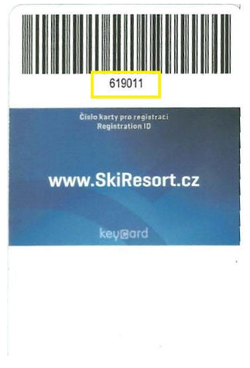
The SkiResort Card number can be found only on the sturdier blue SkiResort Card, located just below the barcode.
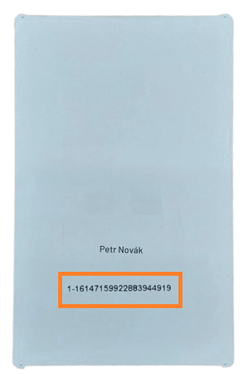
The SKIDATA card number is printed on the softer white card. Each chip card number begins with 01 and contains 23 characters. If there is no zero at the beginning of the number on your card, please add it. The last character is optional.
(Correct format: 01-1614 7133 5350 8109 3666-7 or 01-1614 7133 5350 8109 3666)
LOST OR FORGOTTEN CARD, PURCHASED SKI PASS?
Please have your order number ready and find the nearest manned checkout or customer support office.
A duplicate will be issued. This transaction is subject to a fee of CZK 50 per item.
I CANNOT FIND MY CARD, HOW TO SHOP?
Log in to your account at skiresortcard.cz. In the “Family” settings, under “Manage card,” delete the number of the card you no longer have. You can then collect your skipass at the skiosk.
CAN I BUY SKI PASSES WITHOUT A CHIP CARD?
You don't need a chip card to buy a ski pass. You can pick your SkiresortCard with all purchased ski
passes after concluding your purchase in one of our ten pick-up points called 'sKiosk' in the SkiResort.
WHY DO I NEED A CHIP CARD?
A chip card is required to go through a turnstile at the lifts and slopes.
CAN I BUY SINGLE TICKETS ONLINE?
Single tickets can be bought for cable cars in Janské Lázně (to Hnědý vrch), Zahrádky in Pec pod
Sněžkou, and Portášky in Velká Úpa.
A single ticket cannot be uploaded to the chip card, instead an electronic ticket will be included in the
details of your order.
HOW TO PAIR A CHIP CARD WITH MY ACCOUNT
HOW TO BUY SKI PASSES FOR THE WHOLE FAMILY
In your shopping cart add the number of ski passes you need. Next add the name of the person who will
be using the pass. You need to enter the whole name and the date of birth. Finally complete the order
and you're ready to go.
WHAT IS 1+1 PACKAGE?
1+1 is a bargain package for one Adult or Senior and one Small child born in 2020 and later. This
package includes two ski passes for two individual holders.
CAN I BUY 1+1 WITH ONE CHIP CARD?
1+1 package doesn't allow to combine one purchase with a chip card and the other one without it. In this
case you have to order the package without a chip card and in your order remove (delete) the chip card
you already own.
ARE BENEFITS CARDS ACCEPTED?
SkiResort Ticket offices and ticket machines "sKiosk" accept Benefit+ card (with VISA chip); SkiResort Ticket offices accept Pluxee.
other types are not accepted.
However, Benefit+ cards as well as Pluxee are NOT accepted in the e-shop.
CAN I ADD NIGHT SKIING TO MY DAY PASS?
Yes, you can add night skiing to your 1-4-day ski pass.
FORGOTTEN PASSWORD
We'll send a new password via e-mail. The new password must be confirmed in the sent e-mail.
DEPOSITS - 50 CZK BACK
It was possible to return SkiResort Cards purchased before November 1, 2022, until the end of October 2025.
At the moment, no SkiResort Card can be returned — please keep your cards for future purchases.
IS IT POSSIBLE TO BUY FOR SOMEONE ELSE?
Yes, if you're a registered customer, you simply add another member to your family in the tab Family.
CAN I GET A REFUND IF I DON'T COME?
If you cannot come due to illness, we will refund your money back to your account upon presentation of a
medical report. The claim form is available here.
HOW FAR IN ADVANCE DO I NEED TO BUY A SKI PASS?
Online purchases can be made 15 minutes before skiing.
IS IT POSSIBLE TO CHANGE THE DATE OF A PURCHASED SKI PASS?
Unfortunately no.
HOW DOES A MULTI-DAY SKI PASS WORK?
A multi-day ski pass is only valid for consecutive days.
CAN I APPLY A DISCOUNT TO THE GUEST CARD (KARTA KRKONOŠ)?
A discount can be applied only at a manned checkout. A valid Guest card (Karta Krkonoš) grants a 30 % discount on night skiing.
CAN I APPLY A DISCOUNT TO INNOGY CARD?
A discount to Innogy card Czech can only be applied at a manned checkout (not online).
A 20 % discount is calculated from the current valid price of an adult one-day resort-wide ski pass in
SkiResort ČERNÁ HORA – PEC at a manned checkout.
Innogy card Czech can be applied only to one person and one ski pass daily up to 10 times in winter season
2025/26.
SCHOOL GROUPS - CAN I CHANGE THE NUMBER OF PARTICIPANTS BEFORE THE BEGINNING OF THE TRAINING?
The number of participants can be adjusted directly at a manned checkout upon receipt of the order. The
full amount will then be refunded to your school account.
Is it possible to buy a ski pass for a specific date if I have a flexi pass on my chip carrier?
You can buy a skipass for a specific date – it will be automatically activated on that day. A skipass with a fixed date always takes priority over a Flexiskipas. The Flexiskipas will only be activated if there is no fixed-date skipass loaded on your chip card.
How to Request Deletion of Personal Data
Users have the right to request the deletion of their personal data at any time. To submit a request, please follow these steps:
- Request by email: Send an email to skiresort@skiresort.cz with the subject “Request for Data Deletion.” Please include your full name, contact details, and a brief description of the data you wish to have deleted.
- Request by post: Send a written request containing your full name, contact details, and details of your request to:
- MEGA PLUS s.r.o.
- Černohorská 265
- 542 25 Janské Lázně
- Česká republika
- Telephone support: Call our customer support at +420 734 153 153, where you can request deletion of your data.
After receiving your request:
- We will confirm receipt of the request within 7 days.
- We will process the deletion of your data within 30 days, unless there is a legal reason to retain it.
What is the validity of single-ride tickets?
Tickets purchased at a ticket office are valid only on a specific day chosen by the customer.
A round-trip ticket purchased at a ticket office is valid for 8 days. The last valid day is printed on the ticket. During this 8-day period, the ticket must be used for both the ascent and descent. Each ride can be taken on a different day.
Tickets purchased online at skiresortcard.cz or at self-service ticket kiosks (sKiosks) can be used after the validity date selected during purchase (but not before), meaning anytime during the summer season.
For round-trip tickets purchased online or at a sKiosk, the first ride can be used anytime during the summer/winter season, but the return journey must be completed within 8 days of the first ride.
Which ski pass should I buy for skiing on Černá hora (Janské Lázně)?
If you want to ski in the Černá hora (Janské Lázně) area, select "valid in the whole SkiResort" when purchasing online.
MORE DETAILS ABOUT SKIRESORTCARD?
More information about the SkiResort Card e-shop is available at:
skiresortcard@skiresort.cz
telephone: +420 734 153 153

 Become a fan
 SkiResort TV
 #loveskiresort