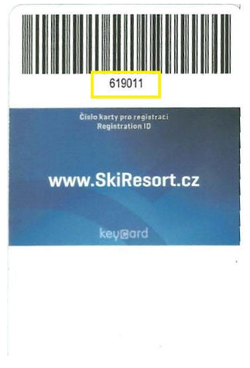
It is very simple. In the “Family” section of your account, enter either the SkiResort Card number or the SKIDATA card number for each member.
Once you collect your reserved ski pass from an sKiosk, the card number will automatically be added to your account.

FAQ
Často kladené dotazy
Buying ski passes online
Which ski pass should I buy for skiing on Černá hora (Janské Lázně)?
If you want to ski in the Černá hora ski area (Janské Lázně), select “valid throughout the SkiResort” when purchasing online.
How far in advance do I need to buy my ski pass?
You can purchase your ski pass online just 15 minutes before you start skiing.
Can I buy ski passes without a SkiResort Card?
Yes, buying a ski pass without a chip card is convenient and costs the same as buying one with a chip card. After completing your purchase, simply collect your SkiResort Card, with your ski pass already loaded onto it, from one of the 10 self-service sKiosk machines at the SkiResort.
How do I buy ski passes for the whole family?
Add as many passes to your basket as you need. In the second step of the purchase, assign each ski pass in your basket to the person who will be using it. Please enter their first name, surname and date of birth. Finally, pay for all the ski passes and you are ready to head to the mountains.
Can I buy a ski pass for someone else?
Yes. If you are a registered customer, add a new member to your account under the “Family” tab.
What is the 1+1 package?
The 1+1 package is a discounted package for one Adult or Senior and one Young Child born in 2021 or later. The 1+1 package includes 2 ski passes that can be used independently of each other.
What if I want to buy the 1+1 package but only have one chip card?
When purchasing a package, you cannot combine a ski pass loaded onto an existing chip card with a ski pass purchased without a chip card. You must therefore order both ski passes without a chip card. Any card already linked to your account must be removed (deleted).
SkiResort Card and chip cards
What is SkiResort Card?
SkiResort Card is a loyalty programme whose members can enjoy a range of benefits, including discounts on ski passes.
Why do I need a SkiResort Card?
Every skier needs a SkiResort Card chip card to pass through the turnstiles and use our lifts and slopes.
Where can I find my SkiResort Card number?
The SkiResort Card number can only be found on the rigid blue SkiResort Card, directly below the barcode.
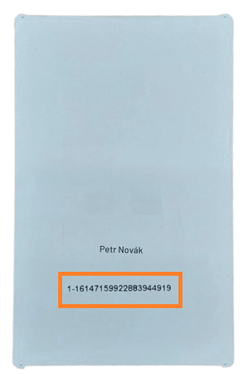
The SKIDATA card number is printed on the more flexible white card. Every chip card number starts with 01 and contains 23 characters. If the leading zero is missing from your card, add it. The last character is optional. (Correct format: 01-1614 7133 5350 8109 3666-7 or 01-1614 7133 5350 8109 3666)
How do I link my SkiResort Card chip card to my account?
How to check your SkiResort Card chip card number
Have you purchased your ski pass online? To ensure that we load it onto the correct chip card, please follow these steps:
Check your SkiResort Card number:
Log in to your SkiResort Card account and check that the correct chip card number is entered for both your profile and your family members.
Have you lost last year’s card?
If you no longer have last year’s card, it is important to delete it from your account. Otherwise, you could accidentally purchase a ski pass for a card you no longer have.
How do you get a new card?
When purchasing online, select the ski pass holder in the second step of the basket and choose “without a card”.
After your purchase, you can collect your new SkiResort Card from an sKiosk machine.
Why is this check important?
Only a correctly linked chip card number ensures that your ski pass will be ready to use as soon as you arrive. If the number does not match, you may encounter difficulties when collecting your ski pass.
If you are unsure how to remove a card, please contact us at skiresortcard@skiresort.cz or call +420 734 153 153.
I no longer have my card or cannot find it – how do I make a purchase?
Log in to your account at skiresortcard.cz. Under “Family” → “Manage card”, delete the number of the card you no longer have. You can then collect your ski pass from an sKiosk.
What if I have lost or forgotten my SkiResort Card and have already purchased a ski pass?
Please have your online order number ready and visit the nearest staffed ticket office or customer support office. We will issue a replacement card. A fee of CZK 50 per card applies.
Card deposit – I would like my CZK 50 back
SkiResort Cards purchased before 1 November 2022 could be returned until the end of October 2025.
SkiResort Cards can no longer be returned. Please keep them for future purchases.
Ski pass validity, changes and refunds
How does a multi-day ski pass work?
A multi-day ski pass is valid only on consecutive days.
Can I add evening skiing to a card that already has a daytime ski pass?
Yes. Evening skiing can be added to a 1–4-day ski pass. This does not affect the validity of the daytime ski pass.
Can I buy a ski pass for a specific date if I already have a Flexiskipas on my chip card?
You can purchase a ski pass for a specific date, and it will activate on that day. A ski pass for a specific date always takes priority over a Flexiskipas. The Flexiskipas only activates when there is no ski pass valid for a specific date on the chip card.
Can I change the date of a ski pass purchased online?
The date of a ski pass cannot be changed.
Will I get a refund if I do not come?
If you cannot come due to illness, we will refund the payment to your bank account upon presentation of a medical report. You can find the claims form here.
Employee benefit cards and discounts
Can I pay with employee benefit cards?
- **Pluxee** – at staffed SkiResort ticket offices.
- **UP BENEFIT** – at staffed SkiResort ticket offices, SkiResort Live rental shops and ski school, and the Relaxpark ticket office.
We only accept Mastercard or Visa employee benefit cards equipped with a chip. Benefit cards cannot be used in the online shop, at self-service sKiosk machines or at food and beverage outlets. We do not accept any other benefit cards or vouchers.
Can I get a discount with a Karta Krkonoš (Guest Card) or Karta občana (Citizen Card)?
Discounts are only available at staffed ticket offices. Holders of a valid Karta Krkonoš (Guest Card) or Karta občana (Citizen Card) receive a 30% discount on evening skiing.
Can I get a discount with an Innogy card?
The Czech Innogy card discount is only available when purchasing at a staffed ticket office, not online.
A 20% discount applies to the current ticket-office price of an adult one-day ski pass valid throughout SkiResort ČERNÁ HORA – PEC.
Use of the Innogy card is limited to one person and one ski pass per day, up to a maximum of 10 times during the 2026/27 winter season.
Individual lift tickets
Can I also buy an individual lift ticket online?
Individual tickets can be purchased online for the gondola in Janské Lázně, the Hnědý vrch and Zahrádky chairlifts in Pec pod Sněžkou, and the Portášky chairlift in Velká Úpa.
An individual lift ticket cannot be loaded onto a chip card. It is only available as an electronic ticket, which you will find in your order details.
How long are individual lift tickets valid?
Tickets purchased at a staffed ticket office are valid only on one specific day chosen by the customer.
A return ticket purchased at a staffed ticket office is valid for 8 days. The last day of validity is printed on the ticket. Both the uphill and downhill journeys must be made within this 8-day period. Each journey can be made on a different day.
Tickets purchased online at skiresortcard.cz or at self-service sKiosk machines can also be used after the date selected during purchase as the validity date, but not before it, at any time during the summer season.
For return tickets purchased online or at an sKiosk, the first journey can be made at any time during the summer/winter season, but the return journey must be made within 8 days of the first journey.
School groups
Online purchases for schools – school groups – can I change the number of pupils before the ski cour
The number of pupils can be adjusted when collecting the order at a staffed ticket office. The full amount will subsequently be refunded to your school’s bank account.
All terms and conditions for purchasing school ski passes can be found on the Offers for Schools page.
Account and personal data
I have forgotten my password
Request a new password, which we will send to you by email. You must confirm the new password using the email you receive.
How to request the deletion of personal data
Users have the right to request the deletion of their personal data at any time. To submit a request, please follow these steps:
- Request by email: Send an email to skiresort@skiresort.cz with the subject “Request for Data Deletion.” Please include your full name, contact details, and a brief description of the data you wish to have deleted.
- Request by post: Send a written request containing your full name, contact details, and details of your request to:
- MEGA PLUS s.r.o.
- Černohorská 265
- 542 25 Janské Lázně
- Česká republika
- Telephone support: Call our customer support at +420 734 153 153, where you can request deletion of your data.
After receiving your request:
- We will confirm receipt of the request within 7 days.
- We will process the deletion of your data within 30 days, unless there is a legal reason to retain it.
Who can I contact with further questions?
For information and questions about the SkiResort Card online shop, please contact:
skiresortcard@skiresort.cz
telephone: +420 734 153 153
For visitors
Ski areas
About us

 Become a fan
 SkiResort TV
 #loveskiresort
Main partners



Partners







© 2026 SkiResort - ČERNÁ HORA – PEC | tel.: +420 734 153 153 | e-mail: skiresort@skiresort.cz
Mobile version | Site map | webdesign: studio WPJ | Cookie files